Packages
Using packages for resolving name conflicts
Name conflict is a recurrent source of errors. It usually happens when one names a variable or - worse - a function with the name of a Matlab function.Though it is really tempting to name variables
For variables, one way to circumvent the problem is to use a structure. For instance, it you want to define two variables
>> v = rand(100,1);
>> S = struct('min', min(v), 'max', max(v));
and you can access these values with
For the record, note that the variables
For functions or classes, packages represent a similar solution. For instance, to disambiguate your own
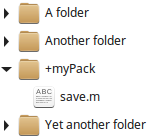
and if this folder is referenced in Matlab's path your function is now called by:
myPack.save() You can put classes in packages and create packages of packages, so don't hesitate to use it everywhere. It's a very simple and powerful way to organize your programs' architecture, and you are guaranteed to avoid shadowing issues.
A note on distributed packages: though it doesn't seem to be documented, one can define multiple packages with the same name (homographs) at different locations of the filesystem and - provided they are referenced in matlab's path - they get merged into one single namespace, with all the content acessible. It can be convenient, but be aware that the risk of shadowing reappears if you use this feature.
Comments
There are no comments on this post so far. Write a comment.